Hoverboards – those two-wheeled self-balancing scooters – might not really hover, but they sure feel magical when you ride one. Understanding how hoverboards work can make you appreciate the tech inside these fun personal transporters. At a glance, a hoverboard consists of two motorized wheels attached to a platform, and it uses a combination of sensors and electric motors to balance itself and respond to the rider’s movements. In this article, we’ll break down the key components and scientific principles that let hoverboards keep you upright and cruising along effortlessly.
Key Components of a Hoverboard
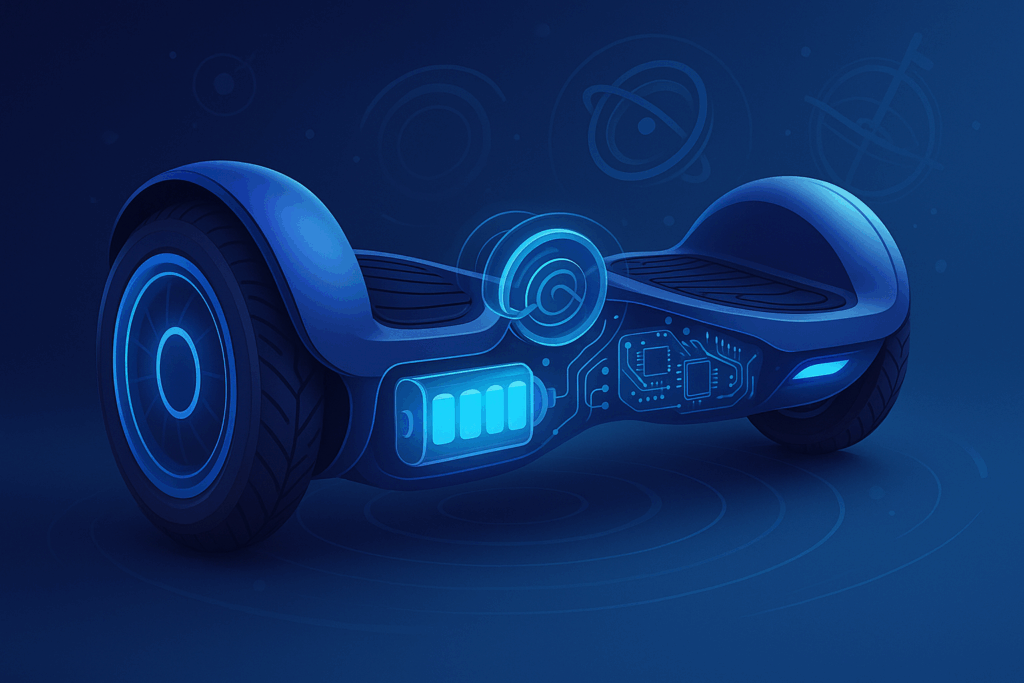
A hoverboard’s ability to balance and move is thanks to a few core components working together in real time:
- Gyroscopes & Accelerometers: These internal sensors are the heart of the self-balancing system. Gyroscopes detect the tilt angle of the board (how far forward or backward it’s leaning), while accelerometers measure speed and changes in movement. They send data to the controller hundreds of times per second.
- Logic Board (Controller): Often compared to a mini-computer or the “brain” of the hoverboard, the logic board processes input from the sensors. It uses this data to determine how the hoverboard should adjust to keep balance and respond to rider commands. The controller instantly sends instructions to the motors based on how you lean.
- Motors (Wheel Hubs): Each wheel has its own electric motor built in. These motors receive commands from the logic board to spin forwards or backwards at specific speeds. By adjusting the speed of each wheel independently, the hoverboard can move forward, reverse, turn, or spin in place. The motors are powerful enough to propel riders at speeds around 6–10 mph, depending on the model.
- Battery Pack: Hoverboards are powered by rechargeable lithium-ion battery packs. The battery supplies electricity to the motors and electronics. Battery capacity varies by model, but most provide anywhere from 45 minutes to a couple of hours of ride time per charge. A quality battery is crucial not only for range but also for safety (more on that later).
- Pressure/Tilt Sensors: Under each foot pad are pressure sensors (or tilt sensors) that detect when and how the rider shifts weight. When you lean forward or back, these sensors relay that information to the logic board so it knows your intent (e.g. accelerate forward or slow down).
All these parts are housed in a sturdy casing that protects them. When you step onto a hoverboard, you’re really standing on a smart system of sensors and motors designed to keep you balanced!
The Self-Balancing Technology
How does a hoverboard balance itself with no handles or support? The answer is a sophisticated self-balancing systemusing the gyroscopes and accelerometers. Here’s what happens under the hood:
When you first power on a hoverboard (on a flat surface), it auto-balances itself – essentially calibrating to what “level” ground is. This is why when you step on, the board doesn’t just flop over; it actively balances upright. The gyroscope inside constantly measures the board’s tilt. If the board starts leaning forward or backward even a few degrees, the gyroscope and accelerometer detect this change. They send signals to the logic board indicating the tilt direction and magnitude.
The logic board then immediately adjusts the wheel motors to counteract the tilt and keep the board level. For example, if you lean forward slightly (shifting your weight towards your toes), the board interprets that as an intention to move forward. The sensors relay that you’ve tilted forward; the controller then spins the motors forward to roll in that direction, which moves the board under you and prevents you from simply falling over. This happens so fast (in fractions of a second) that it feels seamless – you lean, and the board moves exactly enough to keep you balanced while also propelling you in the direction of the lean.
In essence, a hoverboard is constantly performing a balancing act. It’s similar to how a Segway or even how a person on a bicycle balances by making small adjustments. The combination of rapid sensor feedback and motor corrections is what gives hoverboards their self-balancing ability. Even when stationary, if you wobble a bit, the board will adjust the wheels slightly forward or back to correct your center of gravity.
Leaning = Moving: How You Control a Hoverboard
Riding a hoverboard might feel intuitive, but it’s worth explaining how your body movements translate into direction and speed:
- Moving Forward: Gently lean your weight forward (pressure on toes). The hoverboard’s front edge dips down slightly. The sensors detect this forward tilt and signal the motors to move the board forward. The more you lean, the faster the motors spin in that direction, so a stronger lean = more speed. It’s a graceful dance between you and the board’s electronics.
- Slowing Down/Stopping: Leaning back (putting weight on your heels) has the opposite effect. The board tilts backward slightly; the motors then slow down or spin in reverse to balance under you. A slight heel pressure just slows the board, and a more deliberate lean back will make it go in reverse.
- Turning Left or Right: To turn, you apply pressure with one foot. For example, to turn right, you push your left toes down (and/or right heel down). Hoverboards split the balance between two wheels, so by tilting one side, you cause one wheel to spin faster than the other. In a right turn, the left wheel will roll faster forward than the right wheel, causing a pivot to the right. Some riders describe it as “press down with the opposite foot of the direction you want to turn.” It’s almost like skiing or skating motions.
- Spinning in Place: If you tilt one foot forward and the other foot back, the wheels spin in opposite directions – this lets you rotate 360° in place. For instance, pushing your right toes down and left heel down will spin the hoverboard clockwise (one wheel goes forward, the other in reverse).
The key is that small movements make a big difference. Hoverboards are designed to be very responsive, so even a subtle weight shift can cue the sensors. That’s why beginners sometimes have jerky starts – it takes a bit of practice to fine-tune your balance and pressure. Once you get the hang of it, controlling a hoverboard becomes second nature: you think about moving or turning, your body leans unconsciously, and the board zips that way.
Power and Speed Management
Most hoverboards use lithium-ion batteries as their power source. These batteries are lightweight for the amount of energy they hold, which is why they’re used in everything from phones to electric cars. A typical hoverboard battery might be around 36V and a few amp-hours in capacity, giving ranges of roughly 5–10 miles (8–16 km) per charge, depending on terrain and rider weight. The battery feeds the motors through the logic board, which also regulates power to prevent things like sudden jolts.
Hoverboards often have a top speed capped for safety. Entry-level models might top out around 6–7 mph (10–12 km/h), while more advanced or off-road models can reach 10–12 mph (16–20 km/h). The controller will typically govern the speed so that if you try to lean too much (which would demand a speed beyond the safe limit), the board will either not go faster or it will give a warning (like beeping or pushing back against your lean). This is a safety feature to prevent riders from losing control.
Another aspect of power management is tilt protection. If a hoverboard tilts too far (for example, past a ~15-degree angle forward), some boards will intentionally cut power briefly or “push back” to stop accelerating. This prevents the motors from driving the board out from under you. Additionally, when the battery is very low, many hoverboards will gradually reduce performance or make warning sounds – this is both to alert the rider and to prevent the battery from depleting to zero while you’re moving at speed.
Safety Features and Advances
Ever since hoverboards hit the market, manufacturers have added safety features to make them more stable and reliable. Here are a few noteworthy ones:
- UL 2272 Certification: After early hoverboards (back in 2015–2016) had incidents of battery fires, a strict safety standard was introduced. UL 2272 is a certification that indicates the hoverboard’s electrical system (battery, wiring, charger, etc.) has been rigorously tested for safety. Why does this matter? A UL-certified board has protections against overcharging, overheating, short-circuiting – all factors that can cause fires in poorly made devices. Nowadays any reputable hoverboard brand will be UL 2272 certified for peace of mind.
- Auto-Balance and Beginner Modes: Newer boards often have an “auto-balance” function that engages as soon as you power on. This keeps the foot platforms level to the ground, making it much easier to step on and start riding without a wobble. Some boards also offer a beginner mode (sometimes via a companion app or a switch) which limits the top speed and sensitivity, allowing new riders to practice more safely. As you gain confidence, you can switch to the normal or advanced mode for full performance.
- Non-Slip Foot Pads: The top of a hoverboard usually has rubberized or textured foot pads. These give your shoes better grip on the board, so you won’t slip off even if the ride gets bumpy. Keeping your feet planted is key, so this simple feature adds to safety.
- Lights and Sounds: Many boards come with LED headlights or underglow lights. Apart from looking cool, lights make you more visible to others when riding in low light conditions (important if you’re near roads or in a crowded area). Some boards also have warning beeps – for instance, the board might beep if you’re going too fast or if the battery is almost empty. Pay attention to these sounds; they’re essentially the board communicating to you to slow down or charge up.
- Durable Build: Inside a hoverboard, components are often mounted on shock-absorbing brackets, and the casing is built from strong ABS or polycarbonate plastic. This helps the board withstand minor bumps or even the occasional low-speed crash. Still, it’s wise to avoid hitting too many curbs – treat your hoverboard well and it will last longer.
Putting It All Together
When you ride a hoverboard, all these systems work together in harmony. Imagine you’re smoothly cruising down the sidewalk: the moment you lean slightly forward to pick up speed, the sensors instantly relay that to the logic board, which cranks up the wheel motors just enough to accelerate. As you approach a turn, you press down a bit with your left foot – the logic board responds by adjusting the motors to pivot you right. You straighten up to slow down; the sensors note you’re no longer leaning forward, so the motors ease off, gently bringing you to a balanced stop. All of this happens so intuitively that you barely think about the technology under your feet.
Hoverboards truly showcase science and engineering in action. They employ physics principles (like angular momentum for the gyroscopes) and advanced electronics to create a feeling of effortless floatation for the rider. What looks like a simple gadget is actually constantly calculating and correcting to ensure a stable ride.
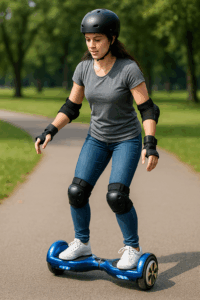
As a rider, your responsibility is to ride safely and take care of the board. Always remember to calibrate your hoverboard if it starts feeling a bit off-balance (check your user manual – typically this involves powering it on in a level position and pressing a reset button or sequence). Keep the firmware updated if your board has an app – manufacturers sometimes improve the balancing algorithms via updates. And, of course, wear a helmet and safety gear, especially if you’re a beginner!
Conclusion
Hoverboards pack a lot of tech into a compact package, enabling a thrilling experience that feels like something out of the future. By combining gyroscopes, accelerometers, speedy microprocessors, and responsive motors, these self-balancing scooters keep you upright and in control as you zoom around. Knowing how hoverboards work not only satisfies curiosity – it also highlights the importance of buying quality boards that use good sensors and certified batteries.
Modern hoverboards are far safer and smarter than the early models, thanks to innovations in self-balancing technology and stringent safety standards like UL certification. As technology advances, we may see hoverboards with even smarter balance systems, longer-lasting batteries, and who knows – perhaps someday truly hovering boards! For now, if you’re ready to experience the fun firsthand, check out our range of hoverboards at HoverboardRadix. Each model we offer is UL 2272 certified and engineered for a smooth, safe ride. Hop on, balance up, and enjoy the sensation of gliding on a hoverboard – now that you know the science that makes the magic happen!
Enjoyed learning about hoverboards? Be sure to explore our other guides on HoverboardRadix, like our Ultimate Hoverboard Buying Guide for tips on choosing the perfect board, and Hoverboard Safety Tips to ride with confidence. Happy hoverboarding!

Anns is a contributor at HoverBoardRadix.com. We are committed to providing well-researched, accurate, and valuable content to our readers.